Document: WM-087 P. Webb
Category: Self-Host 2026-03-25
Hosting a forum in 2026
Abstract
In a world of platform lock-in, self-hosting communities sounds
real good.
Body
For several months I’ve wanted to setup some sort of community but I
didn’t want to use Discord. I have an account of course but I don’t
necessarily enjoy it. I pondered using IRC but nicely designed
clients for macOS/iOS are (to me) nonexistent. I host a
Matrix/Element server for a few close friends but every other month
one of them has issues with seeing messages because of a random token
mismatch or something? Telegram and Signal are out of the question
because an endless stream of text is not conducive to meaningful
conversation and we could all spend less time on our phones.
The solution I kept going back to was forums. But what kind of
forum? I was ready to get started with Flarum[1] but I saw they were
in the middle of transitioning to version 2 and I didn’t want to need
to upgrade so soon after setup so I waited. Waterhole[2] looks REALLY
good but I didn’t feel like paying $300 for something I wasn’t sure
about doing in the first place. So that left me looking at the OGs of
the forum game; phpBB and vBulletin. For the latter, it doesn’t seem
to be doing too well[3]. The former looks dusty old LOL!
Somewhere along the way I came across Simple Machines Forum[4] and a
theme that took me back[5]. That cinched it for me and now my forum,
the WorldWideWebb[6], is online.
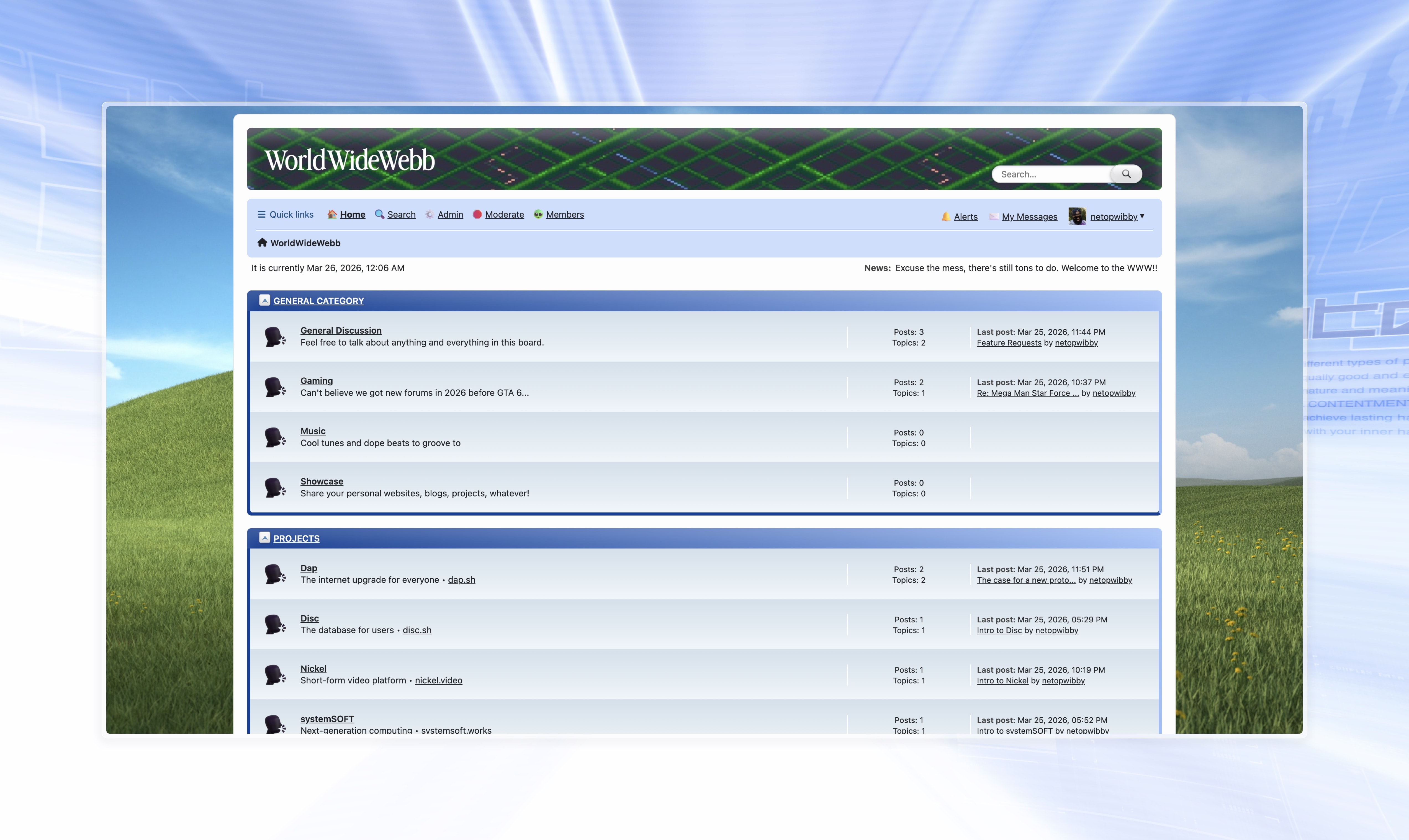 I’m an HTML/CSS/JS/TS guy, PHP is not my forte. I can figure things
out though, and I’m gonna need to figure out more because I do NOT
like how the theme I’m customizing is built. Despite some slight
annoyances, I’m pleased with SMF for the time being.
I did consider building a forum from scratch with BBCode support and
all that, able to be run from a single executable…I have MORE than
enough projects and man, adding this to my plate would’ve been
annoying (this doesn’t mean I’m not gonna do it, just not right now).
## Tutorial
So you wanna setup your own SMF forum? The instructions[7] to do so
assume you have done something like this before. I haven’t dealt with
PHP since Wordpress was king in the mid-2000s so I was lost. Here’s
an actual tutorial!
1. Get a server. I’m using Linode’s 2 GB one for mine.
2. Run these commands, one line at a time:
I’m an HTML/CSS/JS/TS guy, PHP is not my forte. I can figure things
out though, and I’m gonna need to figure out more because I do NOT
like how the theme I’m customizing is built. Despite some slight
annoyances, I’m pleased with SMF for the time being.
I did consider building a forum from scratch with BBCode support and
all that, able to be run from a single executable…I have MORE than
enough projects and man, adding this to my plate would’ve been
annoying (this doesn’t mean I’m not gonna do it, just not right now).
## Tutorial
So you wanna setup your own SMF forum? The instructions[7] to do so
assume you have done something like this before. I haven’t dealt with
PHP since Wordpress was king in the mid-2000s so I was lost. Here’s
an actual tutorial!
1. Get a server. I’m using Linode’s 2 GB one for mine.
2. Run these commands, one line at a time:
mkdir -p /var/www/html && cd $_
curl -O https://download.simplemachines.org/index.php/smf_2-1-7_install.zip
apt install unzip -y
unzip smf_2-1-7_install.zip -d smf
rm smf_2-1-7_install.zip
You just created a directory on your server to install SMF and
deleted the zip file. As of this writing, 2.1.7 is the latest
version. You should check their site for the current latest.
3. Set file permissions so SMF can do what it needs to do:
chown -R www-data:www-data /var/www/html/smf
find /var/www/html/smf -type d -exec chmod 755 {} \;
find /var/www/html/smf -type f -exec chmod 644 {} \;
If you add a new theme, you may need to run these permission
commands again.
4. Time to create the database! I’m not sure if you need the former
package but you definitely need the latter…couldn’t hurt to
install both though!
apt install mysql-server -y
apt install php-mysql -y
After that, open up mySQL:
mysql -u root -p
DO NOT JUST COPY/PASTE THIS NEXT BLOCK.
You need to figure some things out first:
- your_database
- your_admin
- your_password
You’re going to need these values for the web installer as well as
for your database. Plug these into your favorite password manager.
Now that that’s set, replace the placeholder values in this next
block with the ones you chose, and then copy/paste the entire
block into the mySQL prompt you just opened:
CREATE DATABASE your_database CHARACTER SET utf8mb4 COLLATE utf8mb4_unicode_ci;
CREATE USER 'your_admin'@'localhost' IDENTIFIED BY 'your_password';
GRANT ALL PRIVILEGES ON your_database.* TO 'your_admin'@'localhost';
FLUSH PRIVILEGES;
EXIT;
5. Alright, webserver time! I use Caddy so I had to install a PHP
thingy for it as well.
apt install php-fpm -y
With that done, open up your Caddyfile:
nano /etc/caddy/Caddyfile
…and replace its contents with:
chat.webb.page {
root * /var/www/html/smf
php_fastcgi unix//run/php/php8.3-fpm.sock
file_server
encode gzip
}
chat.webb.page is there for illustrative purposes, replace with
your own domain, obviously.
Reload Caddy and check on it (press q to escape the
status screen):
systemctl reload caddy
systemctl status caddy
You should be able to navigate to the domain you listed in your
Caddyfile to finish the installation process. I think you got it
from here.
For security purposes, you’ll want to delete install.php if the
system didn’t do this automatically. This is so no rando coming
across your forum can grief you.
This should take care of things:
rm /var/www/html/smf/install.php
Finally, lock down your settings files:
chmod 640 /var/www/html/smf/Settings.php
chmod 640 /var/www/html/smf/Settings_bak.php
6. Email time! I don’t scambots signing up so I checked whatever
thing in the SMF settings to require email authorization when
signing up. You need an email sender to do this though, and I’m
with Fastmail these days. Surely there’s an easy way to get this
working, right? No, but that’s why I’m here. You’re welcome.
Head to Administration Center → Mail → Settings and here’s
what you put in:
- Mail type: SMTP
- SMTP server: ssl://smtp.fastmail.com
- SMTP port: 465
- SMTP username: NOT your Fastmail alias, your ACTUAL address
- SMTP password: your Fastmail app password
Boy, the SMTP username thing had me going in a spiral. I assumed
the Fastmail aliases were perfectly fine to put there since the
email is going to my original address anyway but on Fastmail’s
end, you’re logging in with invalid parameters.
If it wasn’t for Claude I wouldn’t have figured this out. LLMs are
great for finding where documentation is lacking (and teaching you
how to troubleshoot things you never knew how to check for).
Also, when using Linode you need to send a support ticket to
request the opening of email ports. This friction step contributes
to why their reputation is great, unlike DigitalOcean’s where my
email on the mail server I’m still hosting gets treated as spam.
The more you know, right?
Linode is pretty good with unblocking the ports. I requested this
late one night and by the time I woke up I was good to go.
## FIN
And that’s it!
After naming my forum "WorldWideWebb" I suddenly thought, "Why did I
make the url chat.webb.page when it should be www.webb.page?!"
Making this change broke my forum for a good 5 minutes as I tried to
figure out where to fix things.
First, I had to update $boardurl in smf/Settings.php to match the
new domain name.
Next, I needed to navigate to Administration Center →
Themes and Layout → Theme Settings and update the URLs of
the theme.
## Epilogue
I guess I should explain my intent with this forum, I didn’t fully
touch on it at the jump.
Most of my creation happens in isolation, which is fine, but my best
ideas come when telling others about my ideas and getting feedback or
opposing views. Selfishly, I want y’all to help make my shit better
haha! On these other platforms, we all look the same and our real
estate is confined to algorithmic boxes with high walls that have
constantly moving peepholes. It’s exhausting trying to reach anyone.
In high-school (2002-2006), I had accounts on several forums, from
REO[8] to music production to DJing and more. Some of the best online
experiences of my life started in that era. WorldWideWebb is my way
of evoking that feeling again.
Also, with the constellation of projects I have going on and am
working on at any given moment, I just do not feel like blasting my
Mastodon feed with RFC-length posts. That’s what my blog and (now)
forum[6] are for!
As an aside, it’s funny that my browser URL just reads webb.page
on my forum because browsers these days treat www. as invisible. 🕸️